Making the Most of Woodland Christmas Illustrations in Your Creative Work
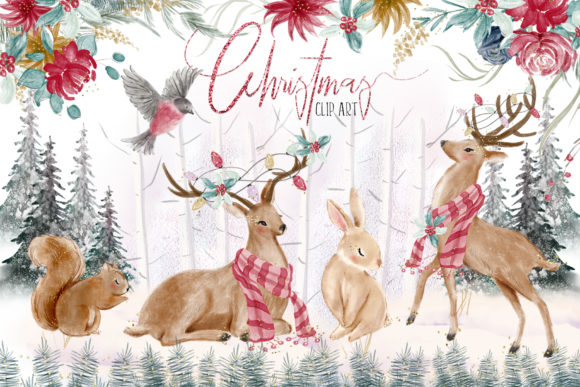
Let's talk about holiday clip art. Specifically, the kind that doesn't look like it belongs on a 1990s greeting card. Woodland Christmas Illustrations, featuring foxes, bears, pine trees, and cozy winter elements, have become a go-to resource for anyone building something around the holidays. Whether you're mapping out your December content calendar or designing physical products for a craft fair, having a solid set of animal Christmas clip art and woodland clipart can make the difference between something that looks thrown together and something that feels intentional. This particular set gives you 44 PNG files at 300 dpi with transparent backgrounds. It's a practical starting point for a wide range of seasonal projects.
Where Holiday Clip Art Actually Gets Used
It's easy to download a bundle and let it sit in a folder. But the real value comes from knowing exactly where and how to apply it. This isn't just about having pretty pictures. It's about solving specific problems in your workflow.
Planning and Organization with Christmas Planner Stickers
If you run a business, manage a household, or freelance, your November and December schedules are probably chaotic. Using animal clipart as Christmas planner stickers gives you a visual shortcut. Instead of writing “product launch” in a tiny box, you place a small bear or pine cone graphic next to it. It draws the eye, adds personality, and helps you scan your week faster. Because the files come with transparent backgrounds, you can resize them to fit any planner layout without ugly white boxes around them. Whether you print them on sticker paper or use them digitally in a planning app like GoodNotes, the 300 dpi resolution keeps the edges clean.
Building a Cohesive Christmas Scrapbook or Journal
Memory keeping is a big deal for many adults in their 30s and 40s. A physical Christmas scrapbook or a digital photo album needs consistent visual themes. Using Christmas scrapbook elements from a single source, like this woodland set, ensures your pages don't look mismatched. You can pair a photo of your kid's first snowfall with a transparent pine branch overlay. Or use a small fox clipart next to a journal entry about a winter hike. The 7”x7” maximum size is generous enough to serve as a focal point on a scrapbook page, while the smaller 4”x2” pieces work well as accents or borders.
Content Creation for Bloggers and Social Media
Bloggers and social media managers are always looking for visuals that don't require a full photoshoot. Woodland Christmas Illustrations work well as featured images for blog posts about holiday recipes, gift guides, or winter fashion. Because the files are separate and transparent, you can layer them over a photo of a cozy sweater or a steaming mug of cocoa. This creates depth without needing advanced Photoshop skills. Animal Christmas clip art, like a sleeping fox or a curious deer, adds an emotional hook that stock photos sometimes miss. It feels warmer. More personal.
Who Benefits Most from a Dedicated Woodland Clip Art Set?
Different people have different constraints. Let's look at how this specific bundle fits into real lives.
The Small Business Owner with a Print-on-Demand Shop
If you sell on Etsy, Amazon KDP, or Shopify, you know the pressure to release seasonal designs early. A set of transparent PNGs saves you from drawing from scratch. You can use the animal clipart for t-shirt designs, mug wraps, or tote bags. The 300 dpi spec matters here. Low-resolution graphics look blurry when printed on a 11oz mug. High-resolution files keep your products looking professional. The separate files also mean you can mix and match. Use the bear for one design, the pine tree for another, and combine them for a third. It increases your output without increasing your workload.
The Educator or Homeschooling Parent
Teachers and parents use visual aids constantly. During the holiday season, keeping kids engaged requires themed materials. Woodland Christmas clip art can be dropped into worksheets, flashcards, or classroom decorations. A transparent background is crucial here because it allows you to place the graphic next to text without distraction. You can create a simple counting worksheet using pine cones or a writing prompt featuring a winter animal. The 44 files offer enough variety to build multiple lessons without repeating the same image. It keeps the material fresh for the kids.
The Hobbyist Crafter
Not everyone uses clip art for money. Many people enjoy making handmade gifts, cards, or gift tags. If you print these at home on adhesive paper, you can create custom labels for homemade jam or cookies. The transparent background means they look natural on kraft paper or colored cardstock. You don't need a cutting machine to use them either. Because the shapes are distinct (animals, trees, ornaments), you can cut them by hand with scissors if you prefer a tactile process. The variety in size (from 7” to 4”) gives you flexibility for card fronts versus small gift tags.
Practical Considerations Before You Download
A lot of clip art bundles look good in the preview but fail in practice. Here's what you should actually check before using this one.
Understanding Color Variations Across Monitors
The product description mentions that different monitors display colors differently. This is a realistic constraint. If you are designing for print, the bright green pine tree on your screen might look slightly muted on a friend's laptop or when printed at a local shop. To avoid surprises, always do a test print on your specific printer before running a batch of invitations or products. For digital use, like social media graphics, monitor calibration matters less because the final output is on a screen.
File Format and Resolution for Different Outputs
You are receiving PNG files at 300 dpi. This is a strong middle ground. PNGs support transparency, so they layer easily over backgrounds. 300 dpi is standard for professional printing. However, if you are designing for a massive banner or a billboard, these might not scale up perfectly without pixelation. For most real-world applications (stickers, cards, website graphics, planner pages, mugs, t-shirts), this resolution is ideal. If you only need images for web or social media, 300 dpi is actually overkill, but it never hurts to have the higher quality master file. You can always scale down.
Licensing and Usage Terms
Because this is offered as a freebie, it's tempting to use it everywhere. Before you put Woodland Christmas Illustrations on a product you intend to sell, double check the included license file. Some free sets allow personal use only. Others are commercial use with restrictions, like a limit on sales volume or a requirement to flatten the design. Understanding this upfront prevents headaches later, especially if you are a small business owner relying on this clip art for your product line.
Making Clip Art Work Harder for You
Having 44 PNGs is great. But using them effectively requires a little planning.
Layering and Composition
Don't just drop a single animal clipart in the center of a blank page. Combine elements. Place a deer behind a transparent frame of snowflakes. Overlap the bear with a large Christmas tree. The transparent background makes this easy. You can build a scene without the graphics fighting each other. This turns a simple sticker set into a versatile design kit.
Color Harmony
Woodland themes typically lean on greens, reds, browns, and whites. If your brand colors are different, consider how the clip art will blend. The illustrations in this set have their own color palette. If your blog or shop uses pastels or neons, these natural tones might clash. That's okay. You can use them sparingly as accents. Or use editing software to adjust the hue. Because the files are PNGs, you can easily apply color overlays in Canva, Photoshop, or Procreate.
Creating a Signature Style
Consistent use of a specific clip art style helps your audience recognize your work. If you run a Christmas-themed blog every year, using the same Woodland Christmas Illustrations creates visual continuity. Readers will associate that cozy fox with your brand. Similarly, if you sell journal kits, using the same animal clipart across planner stickers, cover pages, and blog posts creates a cohesive shopping experience.
The Real Outcome of Using Quality Clip Art
The goal isn't just to have a file. The goal is to save time, reduce frustration, and produce something that looks like you spent more effort than you actually did. This bundle of Woodland Christmas clip art is a tool. It works best when you have a clear project in mind, whether that's a digital planner, a physical gift, a classroom activity, or a product for your online store. Focus on matching the illustration style to your specific task. Check the resolution against your output method. And always test the colors before committing to a large print run.
If you are already working on holiday projects, having these 44 transparent PNG files ready in your digital toolkit removes one more barrier between you and a finished design. Download the zip, unzip the folder, and start placing those woodland animals where they belong.