Indian Wedding Lightroom Presets: A Practical Guide to Stunning Wedding Edits
Editing Indian wedding photography presents a unique set of challenges and opportunities. The vibrant colours, intricate details, and diverse lighting conditions—from bright outdoor ceremonies to dimly lit indoor rituals—demand a workflow that is both efficient and flexible. Indian Wedding Lightroom Presets offer a practical solution for photographers and editors who want to achieve consistent, professional results without spending hours on each image. Whether you are a seasoned wedding photographer or a hobbyist editing a friend's wedding album, understanding how to use these presets effectively can transform your post-processing workflow.
Why Indian Wedding Photography Requires a Tailored Approach
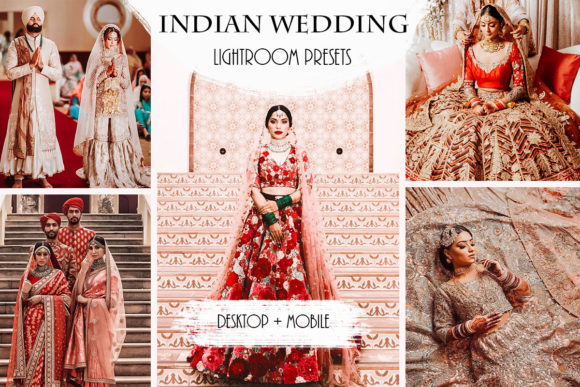
Indian weddings are renowned for their rich colour palettes, elaborate decor, and multiple ceremonial events. Each moment—from the Mehendi and Sangeet to the main wedding ceremony and reception—presents different lighting conditions and colour temperatures. Photographers often struggle to maintain colour consistency across all these events while preserving the natural vibrancy of traditional attire, jewellery, and decor. Generic presets rarely account for the specific hues found in Indian weddings, such as deep reds, golds, oranges, and vibrant greens. Indian Wedding Lightroom Presets are designed with these specific colour profiles in mind, helping you achieve cohesive results across your entire wedding collection.
The challenge is not just about making colours pop; it is about balancing skin tones, managing highlights in bright outdoor light, and retaining detail in shadowed indoor scenes. A preset that works beautifully on a brightly lit outdoor portrait may wash out the details in a dimly lit temple ceremony. This is where a dedicated set of presets, tested on Indian wedding photography, becomes an invaluable resource.
What Indian Wedding Lightroom Presets Offer
This particular collection includes 10 professional Lightroom presets available in two formats: DNG files for the Lightroom Mobile app and XMP files for Lightroom Classic and Lightroom CC on desktop. They are also compatible with Photoshop CC Raw, giving you flexibility across platforms. The presets have been tried and tested on different photographs, meaning they have been calibrated to handle a variety of exposure levels and colour conditions commonly found in Indian weddings. However, it is important to remember that no single preset can perfectly edit every photo. Lighting conditions, camera settings, and subject matter vary widely. These presets serve as a powerful starting point, giving you a consistent base look that you can fine-tune to match the specific needs of each image.
The value of these presets lies not in a one-click perfect edit, but in the speed and consistency they bring to your workflow. Instead of manually adjusting exposure, contrast, temperature, and tone curve for every single image, you can apply a preset and then make targeted adjustments to exposure, temperature, contrast, shadows, and whites. This approach saves significant time while ensuring your images share a cohesive aesthetic across the entire wedding album.
Managing Vibrant Colours Without Over-Saturation
One of the biggest concerns when editing Indian wedding photos is handling the bold colours of traditional attire and decor. Over-saturating reds and golds can make images look artificial, while under-saturating them can strip the photographs of their cultural richness. Indian Wedding Lightroom Presets are designed to enhance these colours naturally, preserving the vibrancy of lehengas, sherwanis, and floral arrangements without pushing skin tones into unnatural territory. The presets aim for a balanced look that feels both festive and authentic.
Balancing Skin Tones Across Diverse Subjects
Indian weddings often feature a wide range of skin tones, from fair to deep, all within the same family or group of friends. A preset that looks good on one person may cast an unflattering hue on another. The presets in this collection are built to handle this diversity by maintaining natural skin tones while enhancing the overall warmth of the image. You can further refine skin tones by adjusting the temperature or using the HSL sliders after applying the preset. The goal is to achieve a pleasing, uniform look that respects every subject's complexion.
Handling Mixed Lighting Conditions
From bright daylight outdoor ceremonies to candlelit indoor rituals, Indian weddings frequently mix natural and artificial light sources. Fluorescent lights, tungsten lamps, and stage lighting can create colour casts that are difficult to correct manually. These presets provide a neutral starting point that helps neutralise unwanted colour casts while preserving the mood of the scene. For heavily mixed lighting, you may need to use the white balance selector or manually adjust temperature and tint after applying the preset. The presets are designed to work with these adjustments, not against them.
Professional Wedding Photographers
If you shoot multiple Indian weddings each season, efficiency is critical. Using Indian Wedding Lightroom Presets allows you to establish a signature editing style that clients recognise and appreciate. You can create a base edit for each major event—Sangeet, wedding ceremony, reception—by selecting the most appropriate preset from the collection and making small batch adjustments. This standardisation speeds up your turnaround time and ensures that your portfolio maintains a consistent quality. For photographers who shoot in RAW, the XMP presets integrate seamlessly into your desktop workflow, allowing you to sync presets across hundreds of images at once.
You may find that certain presets work better for specific lighting scenarios. For example, a preset that enhances golden-hour warmth may be ideal for outdoor ceremonies, while a preset with a softer tone might be better for indoor events with artificial lighting. Experiment with the entire collection to understand how each preset behaves in different conditions. Over time, you will develop a sense of which presets to reach for in common scenarios, making your workflow more intuitive.
Hobbyists and Family Photographers
If you are editing photos from a family wedding or a friend's celebration, you may not have extensive experience with colour grading or raw editing. Indian Wedding Lightroom Presets remove much of the guesswork from the editing process. Apply a preset, then make small adjustments to exposure and contrast until the image looks natural to you. The mobile DNG format is especially useful if you prefer editing on your phone or tablet while travelling. You can quickly edit and share images without needing a computer.
Do not feel pressured to make the preset look perfect on every image. The presets are a tool, not a crutch. Use them as a starting point and trust your eyes. If a photo looks too warm, reduce the temperature slightly. If shadows are too dark, lift them with the shadows slider. The presets handle the complex colour work, leaving you with simple tweaks to fine-tune the final result.
Photo Editors and Retouchers
For editors working on a large volume of wedding images, consistency across a set is paramount. Indian Wedding Lightroom Presets provide a reliable foundation that can be applied to a batch of images before any custom retouching begins. This approach ensures that all images in a delivery share a cohesive look, even if they come from different events or lighting conditions. You can then focus your manual efforts on retouching specific details, such as skin blemishes, stray hair, or background distractions, rather than spending time colour grading every individual image.
If you work with multiple photographers, you may need to adjust the presets to match each photographer's camera profile or shooting style. This is normal and expected. The flexibility of the DNG and XMP formats allows you to modify and save your own versions of the presets, creating custom presets that suit your specific workflow.
Getting the Best Results: Practical Recommendations
To get the most out of Indian Wedding Lightroom Presets, follow these practical tips:
- Start with a well-exposed image. Presets work best when your base photo has a balanced exposure. Overexposed highlights or severely underexposed shadows will limit what any preset can achieve. If your source image is poorly exposed, correct exposure and white balance before applying the preset.
- Apply the preset and assess. After applying, examine the image for colour shifts, exposure levels, and skin tones. Ask yourself whether the mood matches the event and the client's expectations. If the preset pushes colours too far in one direction, use the temperature and tint sliders to bring it back.
- Adjust exposure, contrast, shadows, and whites. These four controls are the most effective way to tailor a preset to your specific image. Brighten shadows to reveal detail in dark areas, adjust whites to set the brightness ceiling, and tweak contrast to add or reduce depth.
- Use the presets as a learning tool. Pay attention to how each preset changes the colours and tones in your images. Over time, you will develop a better understanding of colour grading, which will make you a more confident editor even when working without presets.
- Create a backup of your original files. Always work on copies or use virtual copies in Lightroom. This ensures you can return to the original image if you want to try a different preset or start over.
Understanding the Limitations and Working With Them
It is important to have realistic expectations. Indian Wedding Lightroom Presets, like all presets, will not look perfect on every single photo you apply them to. The example photographs that accompany the presets display the colours and tones that these presets work well with. If your photo has a different colour profile—for instance, predominantly blue or green backgrounds, or unusually warm tungsten lighting—the preset may require more significant adjustments. In such cases, you may need to choose a different preset from the collection that better suits the dominant colours in your image.
This is not a shortcoming of the presets; it is the nature of photo editing. Every image is unique in its lighting conditions, colour balance, and exposure. Presets are designed to accelerate your workflow, not to eliminate your creative input. The best approach is to view each preset as a starting point and use your judgment to refine the result. With practice, you will learn which presets work best for specific scenarios and how to adjust them efficiently.
Choosing the Right Preset for the Moment
Different wedding events call for different moods. A Sangeet might benefit from warm, golden tones that enhance the festive energy, while a solemn temple ceremony might suit a softer, more natural look. With 10 presets in the collection, you have options for a range of aesthetics. Spend time applying each preset to a representative image from each event to see which one aligns with the mood you want to convey. You can also mix presets across a wedding album to create a visual narrative, using warmer presets for joyful moments and cooler, more subdued presets for intimate rituals.
If you are unsure which preset to use, start with one that closely matches the overall colour temperature and lighting of your reference photo. From there, make small adjustments until the image feels right. Over time, you will develop favourites for specific occasions, but keep experimenting—sometimes a preset you rarely use can produce unexpectedly beautiful results under the right conditions.
Final Thoughts
Indian Wedding Lightroom Presets are a practical, time-saving resource for anyone editing Indian wedding photography. They address the specific colour and lighting challenges that make this genre unique, providing a consistent foundation that can be tailored to each image. Whether you are a professional photographer managing multiple weddings, a hobbyist editing a family celebration, or an editor working on a large volume of images, these presets can help you achieve professional-looking results more efficiently. Remember to adjust exposure, temperature, contrast, shadows, and whites after applying the preset, and don't be afraid to experiment with different presets for different events. With practice and an eye for detail, you will create wedding albums that are both beautiful and cohesive.
Thank you for reading, and enjoy the process of bringing your Indian wedding photographs to life.