Canvas Frame Mockup 2: Evaluating Its Role in Artwork Presentation
Presenting artwork in a realistic setting is a critical step for artists, illustrators, and designers who want to communicate the scale, texture, and mood of their work to clients or audiences. Digital mockups have become a standard tool for this purpose, and among the many options available, Canvas Frame Mockup 2 offers a specific approach worth examining. This article provides an objective evaluation of Canvas Frame Mockup 2, exploring its features, practical benefits, limitations, and the scenarios where it may—or may not—be the right choice for your presentation needs.
What Canvas Frame Mockup 2 Provides
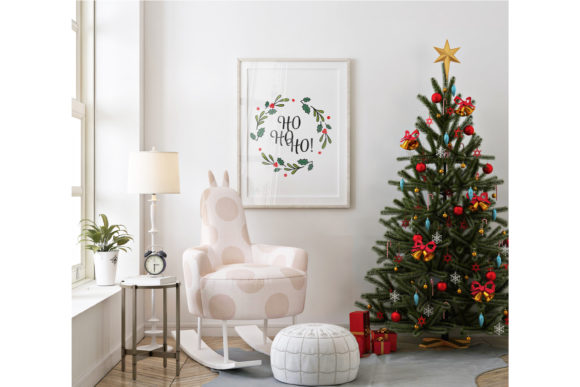
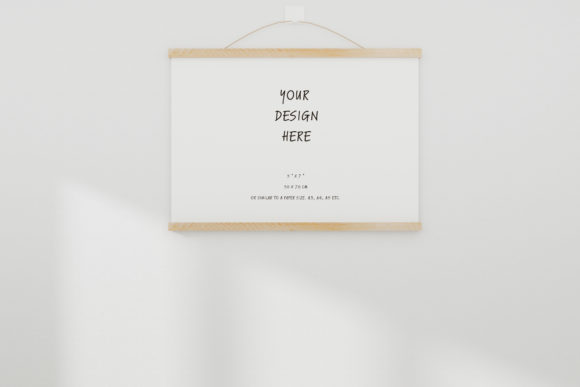
Canvas Frame Mockup 2 is a set of two high-resolution files: a PSD file with a smart object layer and a JPG file featuring a white blank frame. Both are delivered at 300 DPI, which means they are suitable for both digital display and print-oriented previews. The PSD file allows you to place your artwork into the smart object layer, and the mockup renders it within a pre-built scene that includes a background and a framed canvas. The JPG file serves as a quick-use option if you do not need layer editing and simply want to overlay or composite your artwork manually.
Importantly, the product is described as a real photo mockup, not a digitally generated 3D render. This distinction matters because photographic mockups often carry subtle lighting, shadow, and texture details that can lend authenticity to your presentation. The scene is fixed, meaning you cannot move individual elements or change the background. The value proposition centers on saving time by providing a ready-to-use, realistic environment where your artwork becomes the focal point.
Who Might Be Interested and Why
Artists and designers who regularly present work to clients, galleries, or online audiences are the primary audience for a tool like Canvas Frame Mockup 2. The appeal lies in the ability to move from a flat digital file to a contextualized presentation in minutes. Instead of setting up a physical photo shoot or building a 3D scene from scratch, you open the PSD, paste your artwork into the smart object, and save a finished mockup.
This efficiency is particularly valuable for professionals who produce multiple pieces and need consistent, high-quality presentation images. Illustrators, watercolor artists, drawing artists, and digital painters all fall into this category. The mockup helps clients visualize how a piece might look when framed and hung, which can reduce hesitation and support purchasing decisions. For artists selling prints or originals online, having a realistic mockup can improve the perceived value of the work.
Benefits and Strengths of Canvas Frame Mockup 2
Realistic photographic quality. Because the mockup is based on a real photograph, the lighting, shadows, and canvas texture are authentic. This can make your artwork appear as though it was professionally photographed in a gallery or studio setting. The organic feel of a photo-based mockup often resonates more with viewers than a synthetic 3D render.
High resolution at 300 DPI. Both files are optimized for high-resolution output. This means you can use the resulting images for print catalogs, portfolio books, or large digital displays without worrying about pixelation. The resolution also provides flexibility for cropping or resizing if needed.
Time savings through simplicity. The smart object workflow in the PSD file is straightforward. You do not need advanced Photoshop skills to achieve a professional result. For artists who prefer to focus on creating rather than learning complex software, this simplicity is a genuine advantage.
Immediate usability with the included JPG. The JPG file with a white blank frame offers an alternative for those who want to composite their artwork using other software or methods. This dual-file approach accommodates different workflows and technical comfort levels.
Tradeoffs and Limitations to Consider
Fixed scene with no customization. The most significant limitation is that you cannot move items, adjust the background, or change the room environment. If your presentation requires a specific color palette, a particular wall texture, or a different framing style, this mockup will not accommodate those needs. The scene is exactly as provided, and your only creative input is the artwork itself.
Not a scene creator. As noted in the product description, this is not a modular scene builder. If you need to rotate the frame, change the angle of the wall, or add props, you would need to look for a different type of mockup or invest in a scene creation tool. Users who value flexibility over speed may find this restrictive.
Single framing style. The mockup depicts one specific frame and canvas style. While this style may be neutral and broadly appealing, it may not suit every artwork or brand identity. An abstract digital painting might pair well with a sleek modern frame, whereas a vintage watercolor might look better in an ornate or rustic frame. If your work spans diverse aesthetics, a single mockup may feel limiting over time.
No alterations to lighting or perspective. The photographic source determines the lighting conditions and viewing angle. If your artwork has strong directional lighting or relies on specific surface reflections, the mockup's lighting may not complement it perfectly. This is a tradeoff inherent to using a fixed photograph rather than a adjustable 3D scene.
Scenarios Where Canvas Frame Mockup 2 Is a Strong Fit
Rapid client proofs. When a client needs to see how a commissioned piece will look framed, a quick mockup using this product can provide a convincing visual in minutes. The realistic quality helps bridge the gap between a digital file and the finished physical product.
Online shop listings. For artists selling on platforms like Etsy, Shopify, or their own website, consistent mockup images can elevate the storefront. Canvas Frame Mockup 2 offers a clean, professional look that works well for thumbnails and product pages alike.
Portfolio presentation. If you are building a digital portfolio or a printed portfolio book, this mockup provides a polished, gallery-like presentation that can make your work stand out. The high resolution ensures the images look sharp in both digital and print formats.
Artists who produce large volumes of work. If you create frequently and need presentation images for each new piece, the efficiency of a smart object workflow becomes a practical necessity. You can batch-process multiple artworks through the same mockup template quickly.
Scenarios Where Alternatives May Be Worth Considering
When brand consistency requires customization. If your brand or artistic identity demands a specific background color, frame style, or environmental context, a fixed mockup will not suffice. In such cases, a customizable mockup with editable backgrounds, frame colors, and lighting controls would be a better investment.
When you need multiple angles or perspectives. Some mockups offer front, side, and close-up views to showcase artwork from different angles. Canvas Frame Mockup 2 provides a single perspective. If your presentation requires variety, you may need either a multi-angle mockup set or a scene builder.
When working with non-rectangular or unconventional artwork. This mockup is designed for standard rectangular artwork that fits within the smart object aspect ratio. If you work in circular, panoramic, or irregular formats, you may need to crop or distort your work to fit, which can compromise the presentation.
When you want to match a specific interior or gallery setting. Some artists prefer mockups that allow them to insert their own background images or match a particular real-world location. Since Canvas Frame Mockup 2 uses a fixed background, it cannot adapt to those preferences.
Practical Decision-Making Insights
Choosing whether to use Canvas Frame Mockup 2 depends largely on your priorities. If speed, simplicity, and realistic photo quality are your main concerns, and if your presentation needs are relatively uniform, this mockup is a practical and cost-effective tool. It eliminates the effort of staging and photographing a physical framed piece while still delivering a convincing result.
If you value creative control and need to tailor every element of the presentation, you should consider either a more advanced mockup set with multiple customization options or a scene creation tool that gives you full control over the environment. Bear in mind that those options require more time to learn and execute, and they may not always achieve the same level of photographic realism.
For many artists, a hybrid approach works well: use a simple, realistic mockup like Canvas Frame Mockup 2 for routine presentations and client proofs, and invest in a more flexible mockup or a physical photo shoot for special projects or major releases. This allows you to balance efficiency with customization where it matters most.
Another practical consideration is file management. The PSD file with a smart object layer makes it easy to preserve your original artwork as a separate layer. You can create multiple mockup variations without flattening or losing your source file. For artists who like to keep editable backups, this is a useful feature.
Finally, consider your audience. If your clients are accustomed to seeing highly polished, customized presentations, a fixed mockup may feel generic to them. On the other hand, if your clients are primarily interested in the artwork itself and appreciate a clean, unobtrusive presentation, a simple mockup often works better than a busy or overly styled scene.
Evaluating the Value Proposition
Canvas Frame Mockup 2 delivers exactly what it promises: a high-resolution, photographically realistic frame mockup that saves time by providing a ready-made scene. It is not a comprehensive presentation tool, nor does it claim to be. The value lies in its simplicity and the authenticity of the photo base. For artists who need a reliable, repeatable way to present their work in a framed context, it achieves that goal with minimal friction.
The tradeoff is a lack of flexibility. Users who need to adapt the scene to different styles, colors, or compositions will find the mockup limiting. However, for those whose work fits naturally within the provided scene, the limitations are unlikely to be a significant drawback.
In a broader sense, the mockup serves as a bridge between the digital creation process and the physical experience of viewing framed art. It helps both artists and clients imagine the final product in a space, which is a powerful tool for communication and decision-making. When used appropriately, it can enhance an artist's professional presentation without demanding excessive time or technical skill.
For artists who prioritize efficiency and photographic realism over customization, Canvas Frame Mockup 2 is a solid choice. For those who require complete creative control over the presentation environment, exploring alternative mockups or scene builders would be a more suitable path. Understanding your own workflow, presentation goals, and client expectations is the key to making the right decision.