Frame Mockup Bedroom: Realistic Art Display Tool
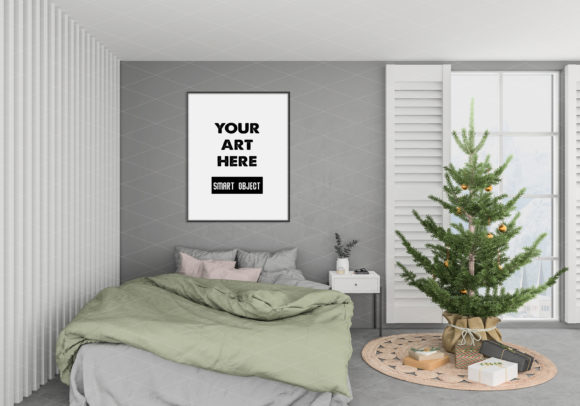
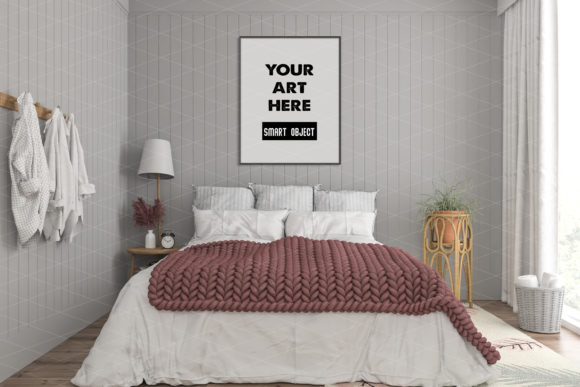
Presenting artwork in a way that feels tangible and lived-in can make the difference between a casual browser and a committed buyer. The Frame_Mockup_Bedroom offers exactly that: a ready-to-use vertical frame mockup set against an interior bedroom background, allowing you to show how your piece would actually look hanging on a real wall. This isn't just a placeholder image; it's a layered Photoshop PSD file built around a smart object layer, giving you control over positioning, scaling, and the final aesthetic. Whether you run an online shop, maintain a blog, or share your work on social media, this mockup helps bridge the gap between a flat digital file and the experience of seeing art in a room.
What makes this tool particularly practical is its simplicity. You don't need advanced design skills or hours of editing time. The file arrives as a JPEG layered PSD, and the smart object layer does the heavy lifting. Double-click that layer, insert your artwork into the new window that opens, save, and the update applies automatically to the main scene. If you want to move the frame along the wall or adjust its size, the transform tool (Ctrl+T in Photoshop) gives you that flexibility instantly. The result is a polished, realistic presentation that feels authentic rather than staged.
Why a Realistic Interior Background Matters for Art Sales
When potential buyers browse artwork online, they often struggle to imagine how a piece will look in their own space. A blank white background or a simple product shot leaves too much to the imagination. The Frame_Mockup_Bedroom solves this by placing your artwork inside a thoughtfully composed interior scene. The bedroom setting provides context: the wall color, the lighting, the surrounding furniture, and the overall mood all contribute to a believable environment. This helps viewers picture the artwork hanging in their own home, reducing hesitation and building confidence in the purchase.
For artists and small business owners, this type of presentation can directly influence conversion rates. Instead of asking a customer to visualize the piece, you show them. The bedroom mockup creates an emotional connection, making the artwork feel like part of a story rather than just an object for sale. It also supports pricing justification: a piece that looks curated and intentional in a real setting naturally appears more valuable than one shown in isolation.
How the Smart Object Layer Simplifies Your Workflow
The core of this mockup is the smart object layer, a feature that makes the entire process both efficient and forgiving. Unlike flattening layers or manually masking images, the smart object preserves your original artwork as a separate element. You can replace the image as many times as you like without degrading quality or needing to redo the placement. This is especially useful if you have a series of pieces to showcase and want to maintain a consistent background across multiple listings.
The workflow is straightforward. Open the PSD in Photoshop, locate the smart object thumbnail in the layers panel, and double-click it. A new tab opens containing the placeholder image. Paste or place your artwork there, resize if needed, then save and close that tab. Back in the main file, the frame automatically updates with your image. No manual alignment, no color correction guesswork, and no repeated setup. Frame_Mockup_Bedroom handles the lighting and perspective of the interior scene, so your artwork integrates naturally into the environment.
For those who prefer not to use Photoshop, the PSD file is compatible with free online editors like Photopea, which support smart objects and layer-based editing. This opens the tool to a wider audience, including hobbyists, freelancers, and small business owners who may not have access to paid software but still want professional-grade results.
Customization and Scalability for Repeated Use
One of the most practical aspects of this mockup is that it allows unlimited use. You are not restricted to a single piece of artwork or a fixed frame position. The vertical frame can be moved along the wall, scaled up or down, and repositioned to suit the composition of your piece. This means you can use the same PSD file to present a wide variety of works, from small prints to larger canvas pieces, without needing a new mockup for every option.
The ability to create an unlimited number of frames from the same file is a significant time-saver. If you run an online shop with dozens of listings, you can batch your presentations efficiently. Open the PSD, swap the artwork, adjust the position if needed, and export. The interior background remains consistent across your catalog, creating a cohesive brand aesthetic that helps customers recognize your work instantly.
That said, it is worth considering that the bedroom setting has a specific mood and color palette. If your artwork style leans toward bold, modern, or industrial pieces, you may want to check whether the soft, residential feel of this background aligns with your brand. For most decorative art, prints, and photography, however, the bedroom environment works well because it feels welcoming and relatable.
Who Benefits Most from This Mockup
Artists and photographers who sell prints or digital downloads will find this mockup particularly useful for product listings. Instead of spending money on professional photo shoots or renting interior spaces, you can generate realistic room shots from your computer. This is especially valuable for emerging artists who need to present their work professionally without a large budget.
Online shop owners on platforms like Etsy, Shopify, or WooCommerce can use the mockup to create consistent, high-quality listing images. A unified look across your store helps build trust and makes your brand appear more established. The bedroom setting is versatile enough to complement most art styles, from abstract to landscape photography.
Bloggers and content creators who write about interior design, home decor, or art can use the mockup to illustrate articles or social media posts. Instead of using generic stock images, you can showcase a specific piece of artwork within a realistic room, making your content more original and engaging. This also supports affiliate marketing efforts if you recommend art prints or framing services.
Social media managers and marketers can create a series of posts featuring different artworks in the same interior setting, maintaining a cohesive feed aesthetic. The mockup helps you produce visuals that feel editorial rather than purely promotional, which tends to perform better on platforms like Instagram and Pinterest.
Educators and workshop facilitators who teach art or design can use the mockup as a teaching tool, demonstrating how presentation affects perception. It offers a simple way to show students the value of context in visual communication.
Practical Tips for Getting the Best Results
To make the most of Frame_Mockup_Bedroom, consider a few practical points. First, ensure your artwork has a suitable aspect ratio for the vertical frame. If your piece is unusually wide or square, you may need to crop or add a border to fit the frame shape naturally. The transform tool allows you to scale the frame itself, so you can adjust the overall size to better match your artwork proportions.
Second, pay attention to lighting and color temperature. The bedroom interior has its own ambient light, so artwork with very warm or very cool tones may look slightly different in this context. You can adjust your image slightly before inserting it, or use Photoshop's adjustment layers to fine-tune the final composite. The smart object layer keeps your original file untouched, so you can experiment freely.
Third, consider the position of the frame on the wall. Moving it to different locations within the scene can change the visual balance. Centered placement tends to feel formal and symmetrical, while a slightly off-center position can make the room look more dynamic and lived-in. Test a few positions to see what best complements each piece.
Limitations and Fit Considerations
No single mockup suits every use case, and Frame_Mockup_Bedroom is no exception. The bedroom background is designed to feel warm and residential, which may not be ideal for very contemporary, minimalist, or commercial art presentations. If your brand targets corporate buyers or a strictly modern aesthetic, you might prefer a mockup with a cleaner, more neutral background. That said, the interior scene is tastefully composed and should work well for the majority of decorative and fine art applications.
Another consideration is file format. The PSD is layered and includes a JPEG composite, which means the background is a raster image. If you need to change the wall color or furniture arrangement, that would require additional editing beyond the frame customization. The strength of this mockup lies in its simplicity: you get a ready-to-use scene with a single variable—your artwork. For users who want full scene control, a more complex 3D mockup might be necessary, but for quick, professional results, this approach is hard to beat.
Bringing Your Artwork to Life
The gap between creating a digital piece and helping someone see it in their home is often bigger than we expect. Tools like Frame_Mockup_Bedroom close that gap by providing a believable, attractive setting that lets your work speak for itself. The smart object layer, movable frame, and reusable PSD file make it a practical choice for anyone who needs consistent, high-quality presentations without spending hours on setup. Whether you are listing a new print in your shop, updating your portfolio, or planning a social media campaign, this mockup gives you a reliable way to show your art as it deserves to be seen: in a real space, ready to be loved.